
Model update
INFO
scripts are under docker/scripts into quetzal-network-editor-backend
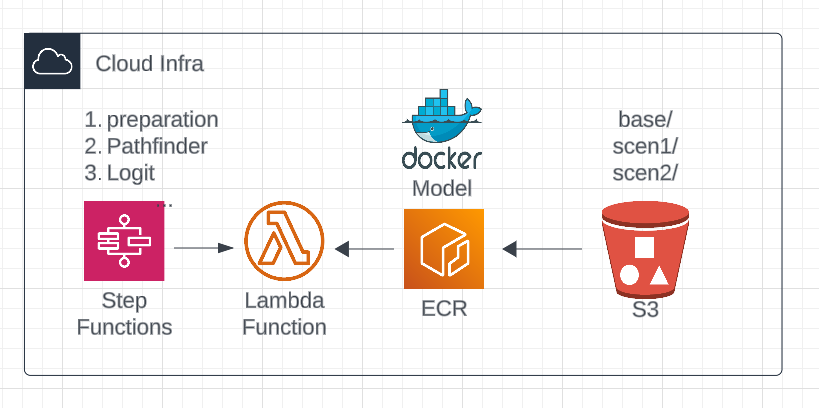
1. Update model (docker)
Windows
make sure to open docker desktop first
- This will build and deploy a docker image of your model.
- Run the command and provide a tag (version) when prompted
./update-lambda.sh <model_folder>./update-ecs.sh <model_folder>On windows
update-lambda.bat <model_folder>update-ecs.bat <model_folder>Info
This function will build the docker locally and push it on aws (ECR), then it will update the cloud function with the newly pushed docker. This operation can be long the first time.
2. Update model steps
This will only push the steps file (step-functions.json or steps.json) Which tells the model steps (which notebooks to run). more info
- Push the step-function definition or steps.
python update-function-config.py <model_folder>python update-model-steps <model_folder>3. Update scenario (S3)
this script will copy a scenario from your local scenario folder <model_folder>/scenarios/<scenario1>/ to the database (S3).
You can add more than one scenario at the time (<scenario> <scenario2> ...)
python update-S3-model-files.py <model_folder> <scenario1> <scenario2>Danger
data will be permenently replace on the database for the updated scenarios.
4. Update Config
INFO
modelConfig in under the scenario _common/modelConfig.json on S3.
this script will copy modelConfig.json from your local quetzal model folder <model_folder>/modelConfig.json to the database (S3).
python update-model-config.py <model_folder>5. Update Docs
INFO
docs in under the scenario _common/docs/ on S3.
this script will copy a the content of a folder from your local quetzal model folder <model_folder>/<docs_folder>/ to the database (S3).
python update-model-docs.py <model_folder> <docs_folder>Danger
data will be permenently replace on the database